TheCodersCorner.com items tagged with embedded-menu.
MenuManager and menu iteration
contains the functions to manage menu items, there is a global instance of this class called on Arduino and mbed boards. Here we present the most commonly used features, check out the reference docs for more details. There are a lot of iteration helper functions that can be used to navigate through menu structures. These are described further down...
Rendering menus to TFT, LCD and OLED using tcMenu
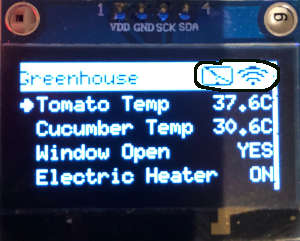
TcMenu supports a wide range of rendering devices, from HD44780 based units using our LiquidCrystal fork through to mono OLEDs and full colour TFT displays using Adafruit_GFX and TFT_eSPI library. Over to the left you see an example of rendering to OLED device with title widgets. You can also easily take over the display to draw your own screen at any...
Menu library remote connectivity tutorial
TcMenu has considerable out of the box remote connectivity on both Arduino and mbed. With support for Ethernet2 library, UipEthernet library, ESP8266 WiFi, ESP32 WiFi and Serial (including Bluetooth Serial) to name a few connectors. Please pay close attention to the following classes in the reference documentation as they are mentioned frequently here: BaseRemoteServerConnection in reference docs TcMenuRemoteService in reference docs...
Menu control using a matrix keyboard
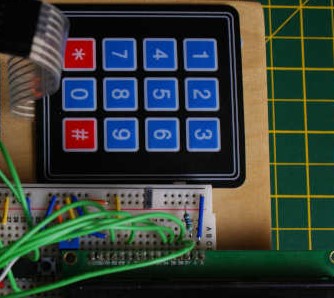
Using a matrix keyboard with TcMenu is straightforward, we use the IoAbstraction Keyboard Manager component to handle the keyboard, along with a custom listener for tcMenu that feeds the menu manager with appropriate events upon key presses. This library allows you to connect your keyboard either using Arduino pins, or any supported IoAbstraction such as the I2C PCF8574 or MCP23017....
TcMenu Designer UI - worked example
Worked example: Building a timer For this example we will create a menu that has two top level menu items; a counter which counts down from the selected value, and a Boolean switch that turns on or off the countdown. It will also have a submenu with one menu item to control the notification method. So lets draw this out conceptually...
Using menu designer to fully manage your menu structure
This is the traditional way of using tcMenu, where you allow the menu designer to manage your menu structure and round-trip every time new menu items were added. This means that you had to run through designer every time you added a new menu item, which divided opinion, some liked it; others thought that it was a painful process. With the...
Working with Menu Item types in tcMenu
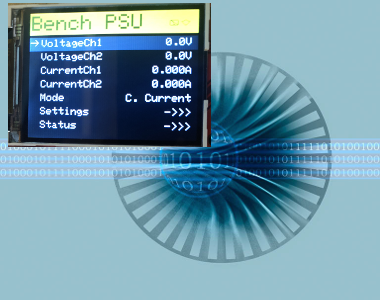
Many embedded applications need to present status and allow users to manage settings. TcMenu provides first class support for both presenting status and managing configuration/settings using menu items. It is possible to use with and without a local user interface. All menu item types can be accessed remotely, and we have a remote API, UI solutions, and connectors to commercial IoT...
Designing menu layouts using web designer
From the tab in the header, you can visually create your embedded menu in the web editor interface. From here you can adjust the menu structure, add menu items, sub-menus, and configure their properties. Any items you add will be inserted in the currently selected sub-menu. Just as with desktop designer, copy and paste works too. In addition to adding...
Menu Code generation for Arduino, PicoSDK, mbed
TcMenu supports a wide range of displays, input devices, and remote control options. To support such a range of hardware, a plugin system is required. Once you're menu is edited and ready, select from the page header to open the generator page. We'll discuss the page below. Each part of this page is discussed in detail below. Configuring the board...
Connect to a remote server plug-in for tcMenu library
In this guide we show how to setup and use the remote server communication plugin for tcMenu. This plugin allows you to reverse the normal connection direction, and have the API side be a server accepting connections from devices. You simply configure the address and port that the connector should connect with, and ensure there is an API listening at the...
These may be of interest
- Similar - Write XML with GroovyBuilder
- Similar - Wrapping JFreeChart as a Groovy builder
- Similar - Reading XML in groovy using XmlParser
- Similar - Generate an ATOM feed with GroovyBuilder
- Similar - Groovychart Bar chart with fixed colour

Supporting us
We maintain several popular embedded projects and work hard to make them even better. If you're looking for commercial services, please do consider us.
Alternatively, you can buy us a coffee to say thanks.
Sharing links
Learn about TcMenu
We build and maintain an embedded menu designer and framework that works on many platforms.