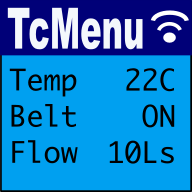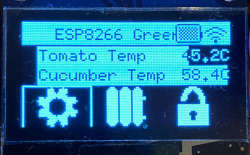
Using the Native C++ fork of the Adafruit GFX library you can control an OLED display using UTF-8 fonts on a PicoSDK or mbed board directly. Right now it supports SSD1306 and SH1106 displays using both I2C and SPI. With the help of tcUnicode it can also display UTF-8 text.
Using tcUnicode you can generate embedded fonts which can be used with this library, but there's also a wide range of fonts that are packaged with the library.
How to get started
Firstly, ensure that IoAbstraction supports the hardware you want to use.
Make sure your project depends on the native C++ fork of the Adafruit GFX library. The absolute easiest way to do this is to use the tcLibraryDev project's CMake starter. You can copy the most similar example from that repository. It is also possible to generate a menu directly using web based TcMenu Turbo.
Setting up using tcLibraryDev for PicoSDK
Simply open the cmakeProjects folder and you'll see there's a CMakeLists.txt file in there that can pull in all the examples, and as long as you have setup correct as described in the cmake cmakeProject's README.md in tcLibraryDev documentation. If you follow the instructions there, you should be able to build the examples and run them on your PicoSDK.
Setting up using tcLibraryDev for mbed
We continue to support mbed for as long as we can. Given the situation, I think you'll find support thinning out elsewhere first. We tend not to break backwards compatibility. For mbed, we use PlatformIO to build the examples, but you could probably arrange the libraries in any way you like. There will be no new features for mbed.
Manually setting up the dependencies
If you choose not to use the tcLibraryDev project, then these are the direct dependencies you need:
    https://github.com/TcMenu/TaskManagerIO
    https://github.com/TcMenu/tcUnicodeHelper
    https://github.com/TcMenu/IoAbstraction
        https://github.com/TcMenu/SimpleCollections
        https://github.com/TcMenu/TcMenuLog
In each of the above dependencies, there's a CMake folder which contains a CMakeLists.txt file. You can use this file in any way convenient to include the source code in your project.
Using the library
You can use pretty much any example code from the Adafruit GFX library. The library is close enough that apart from constructing the objects, everything else should be the same. So you can just copy the code from the Adafruit GFX library examples and replace the Adafruit_GFX object with the one from this library.
You can also use the Adafruit GFX documentation as this library is exceptionally similar API wise.
For TcUnicode, you can use the tcUnicode documentation to understand how to use the library.
These may be of interest
- Similar - Embed Control developer version for controlling and monitoring Arduino
- Similar - Control embedded menu application from browser - embedCONTROL.js
- Similar - Getting started with tcMenu Turbo
- Similar - Liquid Crystal fork example using IO Abstraction library - examples
- Similar - TcUnicode Font format documentation

Want to let us know about something?
- If this is a library documentation page, raise a PR on the documentation site.
- Open a discussion on the Community channels
- Contact us for problems or improvements on the main site.
Table of contents
Supporting us
We maintain several popular embedded projects and work hard to make them even better. If you're looking for commercial services, please do consider us.
Alternatively, you can buy us a coffee to say thanks.
Sharing links
Learn about TcMenu
We build and maintain an embedded menu designer and framework that works on many platforms.