TheCodersCorner.com items tagged with display-driver.
Working with Menu Item types in tcMenu
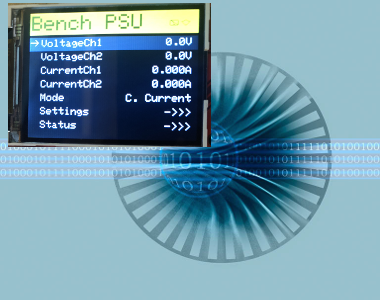
Many embedded applications need to present status and allow users to manage settings. TcMenu provides first class support for both presenting status and managing configuration/settings using menu items. It is possible to use with and without a local user interface. All menu item types can be accessed remotely, and we have a remote API, UI solutions, and connectors to commercial IoT...

Wiring a 20x4 character display to an Arduino board
In this article I describe how to wire a 20x4 character display to an Arduino. I'm assuming you are using a regular 5V 8bit Arduino, if this is not the case this article will not work for you as you'll need voltage level converters. Most character based LCD displays use the same wiring, but I can't guarantee that all will be the...
Designing menu layouts using web designer
From the tab in the header, you can visually create your embedded menu in the web editor interface. From here you can adjust the menu structure, add menu items, sub-menus, and configure their properties. Any items you add will be inserted in the currently selected sub-menu. Just as with desktop designer, copy and paste works too. In addition to adding...
Menu Code generation for Arduino, PicoSDK, mbed
TcMenu supports a wide range of displays, input devices, and remote control options. To support such a range of hardware, a plugin system is required. Once you're menu is edited and ready, select from the page header to open the generator page. We'll discuss the page below. Each part of this page is discussed in detail below. Configuring the board...
Our extensions to Adafruit_GFX for better performance
We provide a few extensions to Adafruit_GFX that improve performance by buffering the display and therefore preventing flickering and repeated operations on the same display area. Canvas support In addition to the standard Adafruit_GFX library that provides a monochrome canvas, we provide a 2bpp (bit per pixel) and 4bpp canvas class that allows you to draw to a buffer in memory...
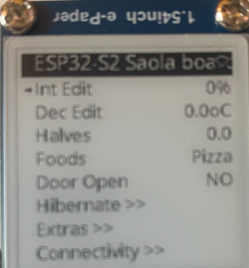
GxEPD2 eInk display plugin for tcMenu
In this guide we discuss the GxEPD2 eInk display plugin for tcMenu, showing how to use and configure it for menu use. From an API/interface perspective, GxEPD2 is roughly equivalent to Adafruit_GFX, but with some additional features and optimizations for eInk displays. You'll need to install the GxEPD2 library from the Arduino library manager before you can use it with tcMenu....
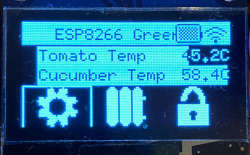
Using SSD1306 to generate a Uno / low memory multi level OLED menu
It is possible to build multi level menus with an OLED display on an Arduino Uno or other low memory board provided you use SSD1306Ascii instead of the U8G2 library, as it uses a lot less memory at the cost of some flexibility. We've tested it with regular I2C SH1106 OLED display units and it works absolutely fine. To use this...
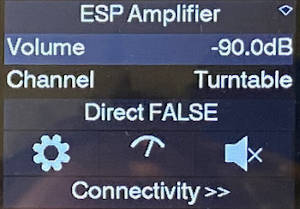
Dark mode themes for all display sizes.
Below we show an example of the dark mode theme, it is designed to have darker background colors with lighter text and images. TcMenu ships with two dark mode color themes and they are only compatible with color displays. The dark mode theme revolves around black and dark grey backgrounds with light grey and white foregrounds. It is available in traditional...
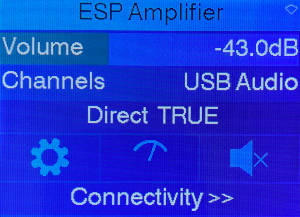
Color themes for all display sizes.
Examples of this theme Information about themes in general . Below we show an example of a color theme, the one shown is the cool-blue theme: TcMenu ships with the cool-blue color theme presently that is only compatible with color displays. Each color scheme has a traditional mode aimed at smaller resolutions, and a modern theme designed for larger fonts, with...
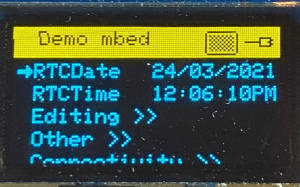
Monochrome themes for rendering menus onto OLED/5110.
Examples of this theme Information about themes in general . Below we show three examples of this theme, first you see an inverse title example, but with sliders turned on, we don't do this by default as it comes with some issues, but some may like it. Second, we show inverse video on a dual color OLED, and lastly, we show...
These may be of interest
- Similar - Belt clamps - what a find!
- Similar - Hand-built router table for the workshop
- Similar - Things learnt from building the first turntable.
- Similar - HI-FI Collective cable kit 6
- Similar - Orbit, a high performance DIY turntable.

Supporting us
We maintain several popular embedded projects and work hard to make them even better. If you're looking for commercial services, please do consider us.
Alternatively, you can buy us a coffee to say thanks.
Sharing links
Learn about TcMenu
We build and maintain an embedded menu designer and framework that works on many platforms.