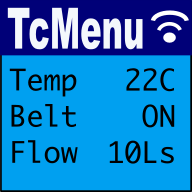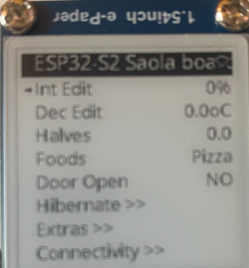
In this guide we discuss the GxEPD2 eInk display plugin for tcMenu, showing how to use and configure it for menu use.
From an API/interface perspective, GxEPD2 is roughly equivalent to Adafruit_GFX, but with some additional features and optimizations for eInk displays. You'll need to install the GxEPD2 library from the Arduino library manager before you can use it with tcMenu.
Some things to bear in mind. These displays are slow, very slow in fact, at the moment they do not interact with input systems particularly well, and we'd only recommend using them when the hardware is displaying information that doesn't change often.
Setting up the GxEPD2 eInk display plugin for tcMenu
- Display type: Choose the display type that you have
- Board pin configuration: Here match these to your hardware arrangements.
- General settings: The number of updates and rotation can be configured here.
- Advanced settings: These mirror the settings from the library.
Theme for eInk displays
Themes tell the menu library how to draw onto the display. You can read about them here: rendering-with-themes-icons-grids.md.
Presently there's only one theme for these displays, but it is highly configurable. This theme is the "EInk block theme".
Font settings
Before choosing a font, first select if you want to use tcUnicode fonts, for regular fonts provided by the library. You can the guide on fonts and how to use them.
- Item font: Choose the font you want to use for menu items.
- Title font: Choose the font you want to use for the title/back menu area.
Spacing and drawing options
Each item has padding included within the background itself. You can set the padding separately for the title and each item. You can also set the gap between the title and first item.
You can also select how the title is presented, if it should be always visible and not scroll, or just part of the menu and scroll off screen.
Theme colors
You can then set the theme colors for regular items, and for title items. We don't know if the color you choose is available on your display, so you may need to experiment. For this we recommend you use the GxEPD2 library's color definitions as they should work with your hardware.
These may be of interest
- Similar - Dark mode themes for all display sizes.
- Similar - Monochrome themes for rendering menus onto OLED/5110.
- Similar - Color themes for all display sizes.
- Similar - TcMenu - Rendering menus to LCD using LiquidCrystalIO library
- Similar - Using SSD1306 to generate a Uno / low memory multi level OLED menu

Want to let us know about something?
- If this is a library documentation page, raise a PR on the documentation site.
- Open a discussion on the Community channels
- Contact us for problems or improvements on the main site.
Table of contents
Supporting us
We maintain several popular embedded projects and work hard to make them even better. If you're looking for commercial services, please do consider us.
Alternatively, you can buy us a coffee to say thanks.
Sharing links
Learn about TcMenu
We build and maintain an embedded menu designer and framework that works on many platforms.