TheCodersCorner.com items tagged with arduino.
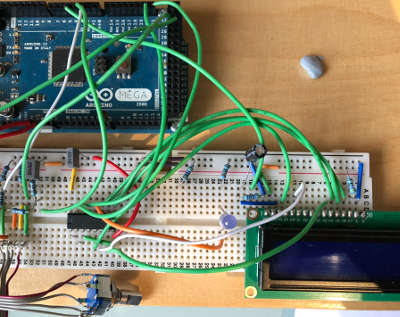
AW9523 I2C IoExpander with LED controller - Arduino and mbed
IO Abstraction library fully supports the AW9523 16-bit IO expander chips on Arduino and mbed. It requires only two pins (three for interrupt mode) SDA, SCL, and optionally INT. Our driver integrates the GPIO, LED controller, and interrupt support providing nearly all functions using familiar Arduino terminology. This device can even be used in conjunction with an AW9523 analog device ...
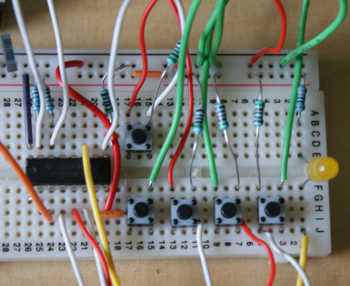
MCP23017 I2C IoExpander for Arduino and mbed
IO Abstraction library fully supports the MCP23017 16-bit IO expander chips on Arduino and mbed. It requires only two pins (three for interrupt mode) SDA, SCL, and optionally INT. Our driver provides nearly all functionality using similar terminology to Arduino itself. The MCP23017 provides 16 additional input or output ports, they have very similar capabilities to device pins and interrupt support...
MPR121 I2C Touch/IoExpander/LED controller - Arduino and mbed
IO Abstraction library fully supports the MPR121 12-bit Touch control and IO expander chips on Arduino and mbed. It requires only two pins (three for interrupt mode) SDA, SCL, and optionally INT. Our driver integrates the Touch, GPIO, LED controller, and interrupt support providing nearly all functions using familiar Arduino terminology. This device can even be used in conjunction with an...

LiquidCystalIO with MCP32017 I2C or any other arrangement
You can connect up a device using just about any arrangement of pins or expander, at the end of the day any device supported by IoAbstraction, including MultiIo (pins and IoExpander mix) can be used here. Examples showing these use cases MCP23017 LiquidCrystal example Shift register 74HC595 LiquidCrystal Back to the main page
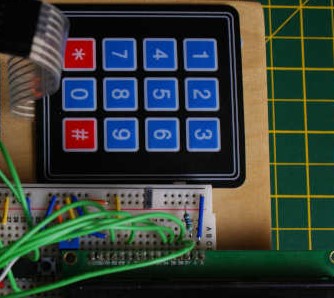
IoAbstraction: Using a matrix keyboard / keypad
Matrix keyboards are arranged such that the keys are in a matrix of rows and columns. This means that instead of needing a spare input for each key, one INPUT for each column and one OUTPUT for each row is all that's needed. In order to use the keyboard, we create a class of type and configure it with an...

Getting started Unit testing with Arduino platform
This article discusses how to unit test a simple project with Arduino, if you're not used to writing unit tests, or need more background, then first read this guide on unit testing embedded projects . Presently, all our testing uses PlatformIO's inbuilt testing framework. It works pretty well overall, we wrote this because we needed the testing to work on...
Programming Arduino using tasks instead of loops - tutorial
In this tutorial for TaskManagerIO I explain the differences between traditional loop based programming; which is very common on the Arduino platform and event based programming based on taskManager. Although event based programming looks slightly more complicated at first, as the sketch and surrounding code gets more complex, eventing will scale to that much easier. Eventing task frameworks make ongoing maintenance...
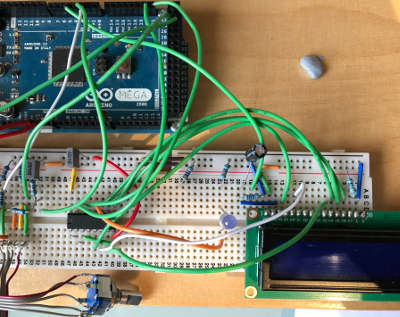
Liquid Crystal fork example using IO Abstraction library - examples
Recently, I have made a fork of Arduino LiquidCrystal (HD44780 display driver library) that allows the library to work with the IO abstraction library, meaning you can configure a display to use Arduino pins, an i2c 8574 IO expander or shift registers by simply changing one line of code in your sketch. There are two additional examples provided with this version...

Arduino multiple digit, 7 segment display tutorial
On the previous page covering single digit displays , we dealt with driving one 7-segment digit. On this page we'll use a multi-digit display and assume 4 digits. Just like single devices, multi-digit 7-segment displays have connections for A-G, DP and common, but they have a common pin for each digit, with one set of A-G and DP pins that are shared....
LiquidCystalIO with PicoSDK/mbed/NativeCpp over i2c or pins
LiquidCrystalIO is now also compatible with PicoSDK and mbed boards. It supports regular mbed pins, I2C backpacks based on PCF8574 and MCP23017 based connections. You can adapt any of the Arduino examples for mbed very easily, as the API is 99% the same. The most recent examples for this are in our native C++ CMake project in https://github.com/TcMenu/tcLibraryDev Back to the...
These may be of interest
- Similar - Write XML with GroovyBuilder
- Similar - Wrapping JFreeChart as a Groovy builder
- Similar - Reading XML in groovy using XmlParser
- Similar - Generate an ATOM feed with GroovyBuilder
- Similar - Groovychart Bar chart with fixed colour

Supporting us
We maintain several popular embedded projects and work hard to make them even better. If you're looking for commercial services, please do consider us.
Alternatively, you can buy us a coffee to say thanks.
Sharing links
Learn about TcMenu
We build and maintain an embedded menu designer and framework that works on many platforms.