TheCodersCorner.com items tagged with library.

LiquidCystalIO with PCF8574 i2c backpack
An I2C LCD backpack based on the PCF8574 chip provides an easy way to get started with LiquidCrystalIO on most Arduino boards. It is usually in one of two configurations as listed below. This library works correctly with the display and even has a shorthand way of creating the LCD for this case. Connectivity combinations for i2c backpacks Pin Option1 Option2...
Task Manager Low Power example for SAMD boards
There are often cases when you'll need to run a micro controller from a battery power source. Unlike when running from mains power, every milli-amp matters. In these cases IoAbstraction's task manager is able to integrate easily with most low power libraries. Task manager works by repeatedly calling the function within or , during each loop task manager evaluates...
Rendering menus to TFT, LCD and OLED using tcMenu
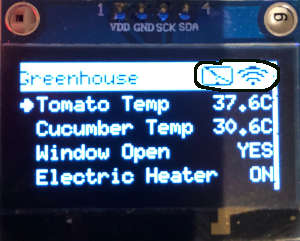
TcMenu supports a wide range of rendering devices, from HD44780 based units using our LiquidCrystal fork through to mono OLEDs and full colour TFT displays using Adafruit_GFX and TFT_eSPI library. Over to the left you see an example of rendering to OLED device with title widgets. You can also easily take over the display to draw your own screen at any...
Menu library remote connectivity tutorial
TcMenu has considerable out of the box remote connectivity on both Arduino and mbed. With support for Ethernet2 library, UipEthernet library, ESP8266 WiFi, ESP32 WiFi and Serial (including Bluetooth Serial) to name a few connectors. Please pay close attention to the following classes in the reference documentation as they are mentioned frequently here: BaseRemoteServerConnection in reference docs TcMenuRemoteService in reference docs...
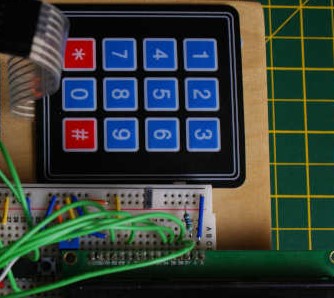
Menu control using a matrix keyboard
Using a matrix keyboard with TcMenu is straightforward, we use the IoAbstraction Keyboard Manager component to handle the keyboard, along with a custom listener for tcMenu that feeds the menu manager with appropriate events upon key presses. This library allows you to connect your keyboard either using Arduino pins, or any supported IoAbstraction such as the I2C PCF8574 or MCP23017....
TcMenu Designer UI - worked example
Worked example: Building a timer For this example we will create a menu that has two top level menu items; a counter which counts down from the selected value, and a Boolean switch that turns on or off the countdown. It will also have a submenu with one menu item to control the notification method. So lets draw this out conceptually...
Using menu designer to fully manage your menu structure
This is the traditional way of using tcMenu, where you allow the menu designer to manage your menu structure and round-trip every time new menu items were added. This means that you had to run through designer every time you added a new menu item, which divided opinion, some liked it; others thought that it was a painful process. With the...
LiquidCystalIO with MCP32017 I2C or any other arrangement
You can connect up a device using just about any arrangement of pins or expander, at the end of the day any device supported by IoAbstraction, including MultiIo (pins and IoExpander mix) can be used here. Examples showing these use cases MCP23017 LiquidCrystal example Shift register 74HC595 LiquidCrystal Back to the main page
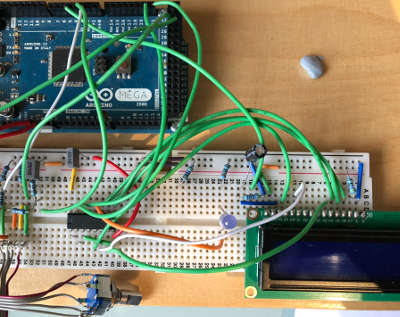
Programming Arduino using tasks instead of loops - tutorial
In this tutorial for TaskManagerIO I explain the differences between traditional loop based programming; which is very common on the Arduino platform and event based programming based on taskManager. Although event based programming looks slightly more complicated at first, as the sketch and surrounding code gets more complex, eventing will scale to that much easier. Eventing task frameworks make ongoing maintenance...
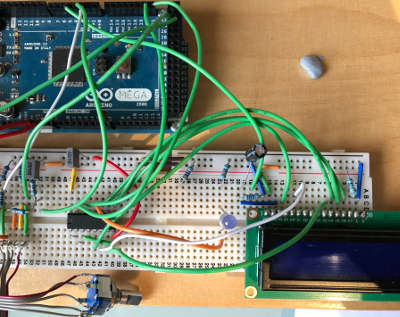
Liquid Crystal fork example using IO Abstraction library - examples
Recently, I have made a fork of Arduino LiquidCrystal (HD44780 display driver library) that allows the library to work with the IO abstraction library, meaning you can configure a display to use Arduino pins, an i2c 8574 IO expander or shift registers by simply changing one line of code in your sketch. There are two additional examples provided with this version...
These may be of interest
- Similar - Belt clamps - what a find!
- Similar - Hand-built router table for the workshop
- Similar - Things learnt from building the first turntable.
- Similar - HI-FI Collective cable kit 6
- Similar - Orbit, a high performance DIY turntable.

Supporting us
We maintain several popular embedded projects and work hard to make them even better. If you're looking for commercial services, please do consider us.
Alternatively, you can buy us a coffee to say thanks.
Sharing links
Learn about TcMenu
We build and maintain an embedded menu designer and framework that works on many platforms.