+++ title = "TcMenu - Using Adafruit_GFX mbed to render menus" description = "" tags = "arduino, display-driver, embedded-menu, menu-plugin" type = "blog" date = "2020-09-10" author = "dave" menu = "tcmenu-plugins" banner = "/products/arduino-libraries/images/electronics/arduino/tcMenu/oled-display.jpg" titleimg = "/products/arduino-libraries/images/electronics/arduino/tcMenu/oled-display.jpg" githublink = "https://github.com/TcMenu/tcMenu" referenceDocs = "/tcmenu/html/index.html" weight = 50 toc_needed = true aliases = ['/products/arduino-libraries/tc-menu/using-adafruit_gfx-rendering/'] +++
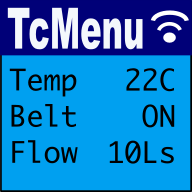
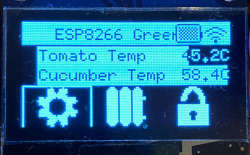
In this guide we show how to use the Adafruit_GFX library for mbed RTOS to renderer menu items with tcMenu. This rendering driver for Adafruit_GFX is built into the core menu designer download, meaning it's available out of the box when MBED_RTOS is selected.
We maintain a fork of Adafruit_GFX library for mbed that currently supports OLED displays only. Therefore, at the moment all options are memory buffered.
Before proceeding, you'll need to make sure you've installed the Adafruit_GFX for mbed library and the library; which also contains the OLED drivers. I'd recommend taking a read through the Adafruit_GFX library documentation if you're not familiar with the library already. We'll also assume you've got a menu structure already prepared in the menu designer UI.
Related documentation:
Plugin and Library details
- Minimum tcMenu Designer version: 1.7
- Library required: https://github.com/TcMenu/Adafruit-GFX-mbed-fork
- What we've tested: mbed RTOS 6 STM32F
Configuring the rendering for your display
First, ensure your menu structure is saved and then choose Code -> Generate Code from the menu. Once the code generation dialog appears, change the current display by either pressing on the image (or on older UIs a button named "Change"). From this menu select the Adafruit mbed driver.
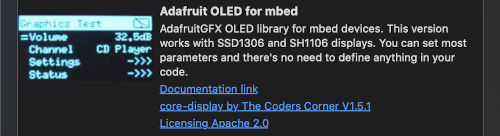
Once you've chosen this display type, the following properties will be added to the table at the bottom:
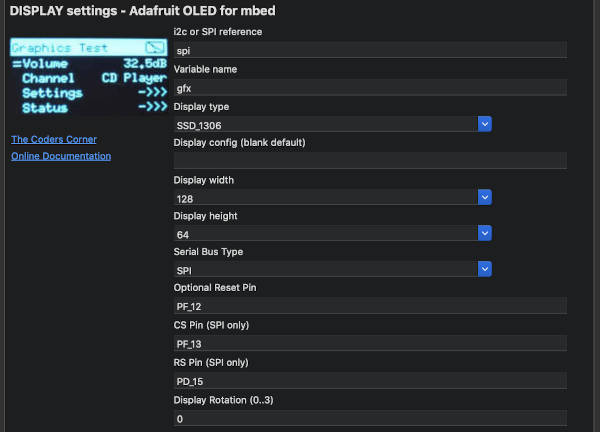
DISPLAY_VARIABLE property
This is variable name that the designer should generate on your behalf, it will export the variable ready for use.
DISPLAY_TYPE property
We support either SSD_1306 and SH_1106 OLED displays at the moment.
DISPLAY_WIDTH and DISPLAY_HEIGHT
This is the native display width and height.
SERIAL_BUS_TYPE
This is the serial bus type that your display is on either I2C or SPI.
BUS_REFERENCE
The variable you've created that represents the serial bus. EG an I2C or SPI reference.
RESET_PIN
Optionally, the reset pin for the device
CS and RS (data register select)
Optionally the RS and CS pins when using SPI
Display Rotation
The rotation of the display between 0 and 3, 0 for regular
Updates per second
How many times the menu structure should be scanned for changes and redrawn if needed. TcMenu tries to minimise redraws where reasonably possible.
These may be of interest
- Similar - TcMenu - Using Adafruit_GFX to render menus
- Similar - TcMenu - Using U8G2 to render menus onto an OLED
- Similar - Using SSD1306 to generate a Uno / low memory multi level OLED menu
- Similar - TcMenu - Using TFT_eSPI library to render menus
- Similar - TcMenu - Rendering menus to LCD using LiquidCrystalIO library

Want to let us know about something?
- If this is a library documentation page, raise a PR on the documentation site.
- Open a discussion on the Community channels
- Contact us for problems or improvements on the main site.
Table of contents
Supporting us
We maintain several popular embedded projects and work hard to make them even better. If you're looking for commercial services, please do consider us.
Alternatively, you can buy us a coffee to say thanks.
Sharing links
Learn about TcMenu
We build and maintain an embedded menu designer and framework that works on many platforms.