This is historic legacy content, left in case it is of use to someone. We prefer to mark old content as deprecated.
In this article I show you how to remove the second 'contact form' header from the default contact form in Joomla without hacking your install. I'd seen a couple of videos on you tube that suggested one should alter the underlying installation. You can do this without altering the installation.
The problem
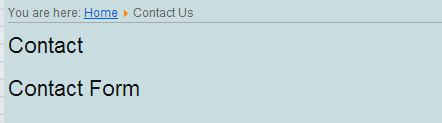
Just to make sure we are talking about the same problem. I am discussing the situation where when creating a default Joomla contact form, there are two headers, which by default will look something like the image shown. If this is the problem you have then it is easily fixed by adding a language override to blank out the second header.
Adding the override
Login to your Joomla console with the usual administrative credentials. Once logged in from the Administrative menu select Extensions - Language Manager Now you should be in a menu labelled: Language Manager: Installed Languages
Just below this menu option you'll see a menu line with an option labelled Overrides Choose this option, where we can override the contact form text (or any other Joomla text you don't like. To add an override simply press the New button on the top right. Once the Edit override dialog appears enter COM_CONTACT_EMAIL_FORM into the Language Constant field and leave the Text field below empty.
Saved the change and ensure you see an information bar containing something similar to 'Language Override was saved successfully'. and then navigate to the contact form. If all went well you'll now only see one header; the "Contact Form" header should no longer be present.
These may be of interest
- Similar - Moving to Hugo static CMS from Joomla
- Similar - Multiple URLs to the same page in Joomla!
- Similar - Recovering from a hacked Joomla site
- Similar - Secure Linux web host: locking down and checking the SSH access logs
- Similar - TcMenu 2.0 - a very complete menu framework / library

Want to let us know about something?
- If this is a library documentation page, raise a PR on the documentation site.
- Open a discussion on the Community channels
- Contact us for problems or improvements on the main site.
Supporting us
We maintain several popular embedded projects and work hard to make them even better. If you're looking for commercial services, please do consider us.
Alternatively, you can buy us a coffee to say thanks.
Sharing links
Learn about TcMenu
We build and maintain an embedded menu designer and framework that works on many platforms.