Action menu items represent a menu item that does nothing more than run the callback when it is selected. There is no hard requirement for it to have a callback, but one without a callback would have no purpose.
Type information for ActionMenuItem
- Class type:
ActionMenuItem/AnyMenuInfoin MenuItems.h - Enum returned by
getMenuType()is MENUTYPE_ACTION_VALUE - This item is based on an Info block
- Information applicable to all menu items
- ActionMenuItem reference documentation
Creating an object from the designer
Choose to add a new menu item, and from the dialog choose Float item, once created the properties panel will look similar to:
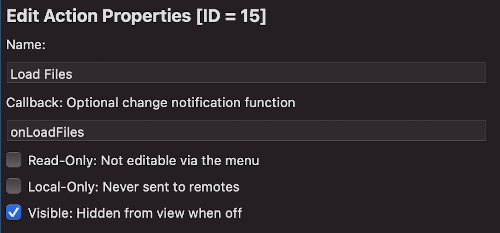
Action Editor UI
For action items there are no special fields over and above the ones for all menu items.
Accessing action menu items from code
There are no specific functions for action items.
Creating an action menu item from the CLI
To create an action menu item from the CLI here is a template command (options in square brackets are optional):
tcmenu create-item --parent 0 --type action --name ActionName [--localonly --readonly --hide]
The structure of an action menu item in the EMF file is:
{
  "parentId": 0,
  "type": "actionMenu",
  "item": {
    "name": "ActionName",
    "variableName": "ActionName",
    "id": 3,
    "eepromAddress": 0,
    "readOnly": true,
    "localOnly": true,
    "visible": false,
    "staticDataInRAM": false
  }
}
Creating an action menu item manually
In nearly all cases it’s better to create items using the designer. However, this is how you create an additional action item manually should it be required. You can drop the const and PROGMEM from the INFO structure if you choose to create in RAM (isInProgmem parameter set to false). Even for RAM items never change the ID after adding to menuMgr.
[const] ActionMenuInfo minfoActionItem [PROGMEM] = { "Action Item", myId, 0xFFFF,
                                         0, myCallback };
ActionMenuItem menuActionItem(&minfoActionItem, &nextMenuItem, [bool isInProgmem = true]);
Above we create an action item along with it’s associated info structure. myId should be replaced with the unique ID for the item, myCallback will be called when the item is selected.
Other pages within this category
- Working with action items - ActionMenuItems
- Working with boolean values - BooleanMenuItems
- Working with fixed choices - EnumMenuItems
- Working with floating-point values - FloatMenuItems
- Working with large numbers - EditableLargeNumberMenuItem
- Working with lists of data - ListRuntimeMenuItem
- Working with numeric values - AnalogMenuItem
- Working with RGB color choice items - Rgb32MenuItem
- Working with scroll choice items - ScrollChoiceMenuItem
- Working with sub-menus - SubMenuItems
- Working with text, date, time and IP address items -
- Detailed description of MenuInfo based menu items
- Detailed description of RuntimeMenuItem
You'll also find me on: